

we no longer use the daos.fun wallet browser extension
- this browser extension is no longer supported.
- the daos.fun wallet browser extension is deprecated.
- you can uninstall this browser extension from your browser.
- if you used to use this browser extension, you have to resetup your admin panel.
- if you see a daos.fun logo next to your wallet address, you are using the deprecated wallet.
setting everything up to trade
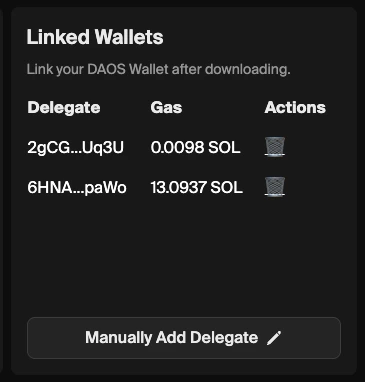
- go to your admin panel while you are logged in with your Creator wallet.
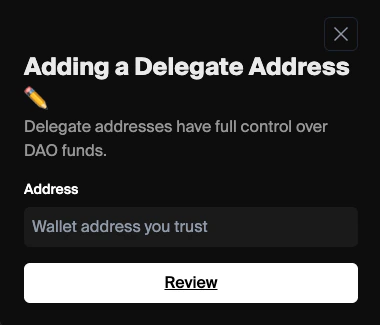
- in the Linked Wallets section, click “manually add delegate”
- paste in your wallet address
- sign the transaction when prompted
- great! now you’ve linked your wallet.
let’s trade!

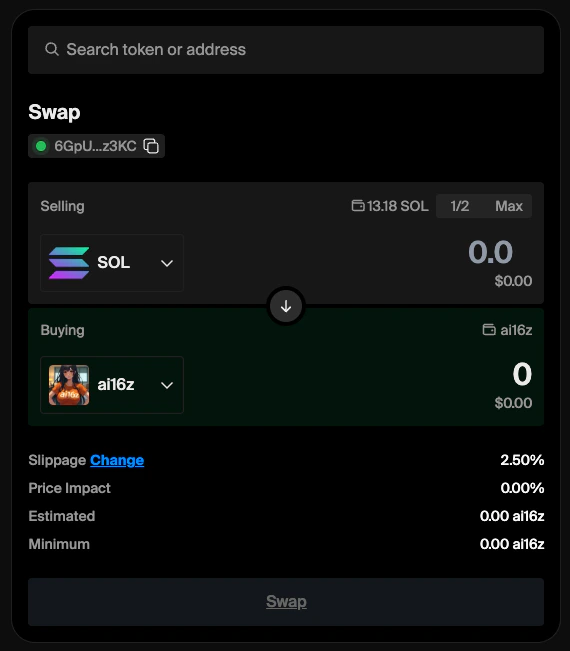
- click the “trade” button
- swap SPL tokens in a familiar, jupiter-style interface
troubleshooting
- does your signing wallet have gas? keep a small amount of gas in the linked wallet
- do you have the correct wallet connected to daos.fun?
- are you using phantom? works the best
- are you using a reasonable slippage?
- have you tried splitting a larger transaction into multiple smaller transactions? removing decimal places or using smaller size can help.
additional facts
- we only support trading spl tokens thru the jupiter API— currently no nfts, perps, defi, or bridging is supported
- all daos spawn only being able to trade jupiter-verified tokens — you can make a proposal in governance to allow you to trade unverified jupiter SPL tokens.
- you can’t withdraw tokens directly from the aum
- you can have up to 3 signers linked to the day — be aware that each wallet is a full signer and can execute transactions
- the trading experience is good but is not optimized for high-frequency or time-sensitive trading patterns. we suggest avoiding these strategies.
”Wallet Not Authorized” error
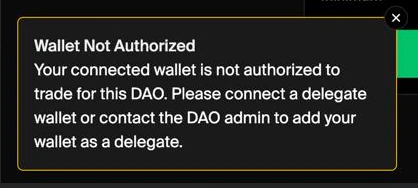
- the most common reason for this error is that you are using the deprecated daos.fun wallet.
- another reason you may get this error is that you are using a phantom or other wallet that is not delegated.
- delegate the wallet and try again.